

MODS
New Release: Rail Command Center Unreal Engine & C++ FICSIT.app Verified
Gaming // Unreal Engine // Community Tooling

Game Mods & Custom Content

Bringing software engineering, C++, and Unreal Engine systems together to craft high-impact quality-of-life mods and tools for the gaming community. Explore released modifications, version changelogs, and installation guides below.

New: Rail Command Center ↓ Super Simple Signs (v1.0.3) ↓ Browse All Coding Projects →
Featured Modification // Satisfactory Trains

Rail Command Center

Live railway telemetry displays, station arrival boards, fleet monitors, and an interactive real-time world dispatch radar map.

View on FICSIT.app ↗
Rail Command Center Logo
SATISFACTORY // RAILWAY & TELEMETRY

Rail Command Center

Real-Time Train Telemetry, Inbound ETAs, Fleet Diagnostics & Interactive Dispatch Radar

New Release Satisfactory 1.2.5.1+ (CL 520140) SML 3.12.1+ Dedicated Server & Singleplayer

Turn your train stations and central control rooms into a live railway operations hub! Rail Command Center adds interactive digital transit boards and real-time network dispatch maps to a dedicated Transport → Rail Command Center build menu subcategory.

All displays behave just like vanilla Satisfactory signs — snap them flat onto walls, pillars, and beams, or place them on foundations with adjustable telescoping sign poles.

Rail Command Center Displays
Interactive Operations Hub • Live Telemetry
• 01

Platform Line Displays

Live platform arrival & status boards (2m, 4m, 8m, 16m) showing docked train state, inbound trains with live ETAs (MM:SS), speed (km/h), and distance. Auto-detects nearest station or tracks any station worldwide.

• 02

Central Station Boards

Network-wide station directory and occupancy monitors tracking total stations, occupied platforms, next arriving trains, and live ETAs with auto-rotation or fixed screen pinning.

• 03

Fleet Overview Boards

Locomotive & consist monitor for your entire fleet: active train counts, network average speed, consist breakdown (Locomotives + Freight Cars), autopilot/manual modes, and alert states (Cruising, Stopped, Derailed).

• 04

Real-Time Dispatch Radar

Top-down schematic radar overlaid 1:1 on the world map. Tracks curved track splines, live Block & Path Signals (Green, Red, Cyan, Magenta), live consists, and seamless 2×2 video wall mega-map mode!

Display Types & Form Factors

▬
Station Line Display
2m, 4m, 8m Small • 16m Large

Platform arrival board with live train ETAs, current speed (km/h), distance (m), and docked status indicator.

■
Central Station Board
2m, 4m, 8m Small • 16m Large

Network-wide station directory monitoring platform occupancy, next arriving trains, and auto-rotating page cycles.

■
Fleet Overview Board
2m, 4m, 8m Small • 16m Large

Fleet-wide locomotive and consist diagnostics tracking driving mode, speed, next stop, and derailment alerts.

▦
Railway Dispatch Map
4m, 8m Square, 16m, 24m Wall

Real-time schematic radar rendering track splines, active signal aspects, and 2×2 multi-screen video wall mode.

Quality-of-Life Tooling // Satisfactory

Super Simple Signs (Satisfactory)

Instant web-to-sign image loading directly in-game with auto-scaling, modern WebP support, and infinite vector SVG rendering.

View on FICSIT.app ↗
Super Simple Signs Logo
SATISFACTORY // QUALITY OF LIFE

Super Simple Signs

Direct Web-to-Sign Image Loading Across All 10 Vanilla Digital Sign Form Factors

v1.0.3 Live 10 Vanilla Form Factors Satisfactory 1.2.5.1+ (CL 520140) Client & Dedicated Server

Organizing and personalizing a sprawling mega-factory in Satisfactory shouldn't require complex workarounds, manual .pak file extraction, or game restarts.

Super Simple Signs (v1.0.3) brings direct in-game web image loading to all 10 official vanilla digital sign form factors. Just paste any direct image URL (PNG, JPG, modern WebP, or vector SVG) into the sign's in-game input, and it instantly renders with dynamic aspect-ratio fitting and pure black letterboxing. Updated with full compatibility for Satisfactory 1.2.5.1 (CL 520140) and SML 3.12.1.

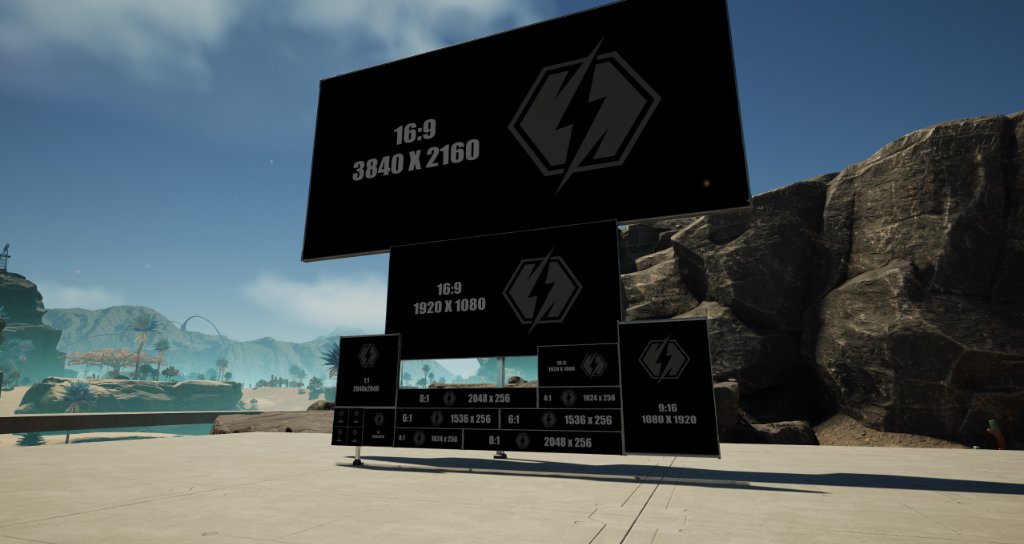
Super Simple Signs running live in Satisfactory across all digital sign sizes
In-Game Test Bench • All 10 Form Factors • Desert Biome
• 01

Direct Web-to-Sign Loading

Copy any direct image URL from your browser, paste it into the in-game sign field, and it updates immediately without leaving the game.

• 02

Modern Formats & Vector SVG

Full support for standard .png and .jpg, high-compression .webp, and infinitely scalable .svg vector graphics for zero pixelation.

• 03

All 10 Vanilla Form Factors

From Square Tiny (0.5m) to Huge (8m × 4m), all 10 official digital sign form factors are fully supported with dynamic aspect-ratio fitting and safe deprecation of legacy assets.

• 04

Engineered in C++ with SML

Native C++ hooks into the Satisfactory runtime ensure negligible CPU/GPU overhead and seamless frame rates even with hundreds of active signs.

The 10 Official Vanilla Digital Sign Form Factors (v1.0.2)

■
Square Tiny
0.5m × 0.5m • 1:1 Ratio (512)

Compact machines, small switchboards, fuse boxes, and tight container labeling.

■
Square Small
1m × 1m • 1:1 Ratio (1024)

Item icon badges, standard hazard symbols, and department icons.

■
Square
2m × 2m • 1:1 Ratio (2048)

High-visibility facility logos, warning emblems, and prominent factory branding.

▬
Small (4:1)
2m × 0.5m • 4:1 Ratio (1024×256)

Storage container manifests, bin labels, and narrow equipment descriptors.

▬
Small Wide (6:1)
3m × 0.5m • 6:1 Ratio (1536×256)

Conveyor manifold headers, pipeline descriptions, and multi-bay directions.

▬
Small Very Wide (8:1)
4m × 0.5m • 8:1 Ratio (2048×236)

Ultra-wide process banners, continuous walkway labeling, and long warning strips.

❚
Portrait (9:16)
2m × 3m • 9:16 Ratio (1024×1920)

Vertical production flowcharts, floor plans, manifest pillars, and vertical posters.

▬
Medium (2:1)
2m × 1m • 2:1 Ratio (2048)

Standard production stats, power station displays, and department signs.

▬
Large (2:1)
4m × 2m • 2:1 Ratio (2048)

Highway overhead signage, train station route boards, and main factory gate markers.

▬
Huge (2:1)
8m × 4m • 2:1 Ratio (2048)

Massive facility billboards, megastructure naming, and high-altitude skyway visibility.

Mod Changelogs // Super Simple Signs

Super Simple Signs: Version History

Comprehensive patch notes, engine re-cooks, architectural overhauls, shader refactors, and bug fixes for Super Simple Signs.

v1.0.3 Latest v1.0.2 Major Overhaul
VERSION 1.0.3 Latest Release Released November 21, 2026

Satisfactory 1.2.5.1 & SML 3.12.1 Compatibility Rebuild

Updated compatibility for Satisfactory 1.2.5.1 (CL 520140) and SML 3.12.1. Rebuilt and re-cooked assets on the latest Unreal Engine (v5.6.1-css-87) and starter project headers, resolving multiplayer and dedicated server network replication desyncs.

Download v1.0.3 on FICSIT.app ↗ CL 520140 • SML 3.12.1
1.2.5.1 Game Version (CL 520140)
^3.12.1 SML Version Target
v5.6.1 UE Engine Re-Cook
Pass Multiplayer Replication
01

Engine Pipeline & Multiplayer Networking Updates

  • Satisfactory 1.2.5.1 (CL 520140) Target: Rebuilt the mod binaries to align with Satisfactory patch 1.2.5.1 and Satisfactory Mod Loader (SML) 3.12.1.
  • Latest Unreal Engine Re-Cook (v5.6.1-css-87): Re-cooked all mod content packages using the latest Coffee Stain Studios UE5 toolchain to eliminate asset schema warnings and crashes on launch.
  • Network & Multiplayer Replication Fix: Synchronized starter project network headers and RPC definitions to prevent client timeouts, player inventory desyncs, and disconnects when placing or editing signs in multiplayer and dedicated server sessions.
VERSION 1.0.2 Major Overhaul Released November 8, 2026

Comprehensive Mod Overhaul & Polish Pass

This changelog documents the complete overhaul and polish pass conducted on SuperSimpleSigns: replacing legacy modular models with the 10 official Satisfactory digital sign form factors, fixing mounting bracket alignment and pole scaling, rebuilding the screen material for automatic aspect-ratio handling, and hooking up official vanilla UI icons.

Download v1.0.2 on FICSIT.app ↗ Satisfactory (SML) Verified
10 / 10 Vanilla Form Factors
14 / 14 Material Instances
1:1 Vanilla Pole Alignment
0 Compile Errors
01

Sign Roster & Build Menu Overhaul

  • Adopted All 10 Vanilla Digital Sign Form Factors:
    Square Tiny (0.5m × 0.5m) Square Small (1m × 1m) Square (2m × 2m) Small (2m × 0.5m, 4:1) Small Wide (3m × 0.5m, 6:1) Small Very Wide (4m × 0.5m, 8:1) Portrait (2m × 3m, 9:16) Medium (2m × 1m, 2:1) Large (4m × 2m, 2:1) Huge (8m × 4m, 2:1)
  • Safe Deprecation of Legacy Signs: Preserved legacy assets (BP_SimpleSign_1x1, 1x2, 2x1, 2x2, 8x4) in the project files to ensure existing player saves remain functional without crash or corruption.
  • Clean Menu Experience: Removed legacy signs from build categories and unlock schematics so only the 10 new signs appear in the build menu.
  • Categorization & Recipes: Created and assigned SubCat_SimpleSigns under the Organization build category. Mirrored vanilla recipe ingredients, build costs, and schematic unlocks (Schematic_SimpleSigns_V2) for seamless progression.
02

Mounting Bracket & Pole Scaling Fixes

  • Restored Vanilla Pole Attachment Bracket (SM_SSS_PoleHolder_01): Added the mounting bracket subobject to all 8 post-mounted signs (Square_Tiny, Square_Small, Square, Small, SmallWide, SmallVeryWide, Portrait, Medium).
  • Hierarchy & Rotation Correction: Corrected component parenting by attaching the pole holder component to SignMeshProxy (the frame) rather than RootComponent. This permanently fixed a 90° yaw misalignment between the bracket and the frame.
  • Dynamic Counter-Scaling for Uniform Poles: Compensated for frame scaling on wide signs so pole meshes are identical in thickness to vanilla poles across all variants:
    SmallWide (Frame Y scale = 1.5) → Bracket scale: (X=1.0, Y=0.667, Z=1.0)
    SmallVeryWide (Frame Y scale = 2.0) → Bracket scale: (X=1.0, Y=0.500, Z=1.0)
    Portrait (Frame Z scale = 1.714) → Bracket scale: (X=1.75, Y=1.75, Z=0.583)
  • Verified Spawning: In-engine tests confirmed world position, orientation, and pole thickness match vanilla 1:1.
03

Screen Surface Shader (M_SimpleSignSurface) Refactor

  • Resolved Narrow "Strips" Issue on Wide Signs:

    Root Cause: Previous shader used MaterialExpressionTextureProperty (TMTM_TEXTURE_SIZE) which evaluates at material compile-time to the default placeholder (128×128, ratio = 1.0) rather than reading runtime/instance textures. This forced ImageAspectRatio = 1.0, causing the shader to divide wide signs (4:1, 6:1, 8:1) by 1.0 and compress the UVs horizontally into narrow central strips.

    Fix: Replaced TextureProperty with an explicit ImageAspectRatio scalar parameter alongside ScreenAspectRatio.

  • Mathematical Aspect-Ratio Fitting & Letterboxing:
    Ratio = ScreenAspectRatio / ImageAspectRatio
    S_U = max(Ratio, 1.0)  |  S_V = max(1 / Ratio, 1.0)
    U_new = (U - 0.5) × S_U + 0.5  |  V_new = (V - 0.5) × S_V + 0.5

    Includes boundary masking (Step functions) to render out-of-bounds UVs as pure black (letterboxing/pillarboxing) without texture stretching or clamping artifacts.

  • Configured All 14 Material Instances (MI_SimpleSignSurface_*): Set default ImageAspectRatio equal to ScreenAspectRatio for each form factor (Square: 1.0, Small: 4.0, Small Wide: 6.0, Small Very Wide: 8.0, Medium/Large/Huge: 2.0, Portrait: 0.5625). Result: Edge-to-edge full-screen display with zero distortion.
04

Screen Plane (SignMesh) Alignment & Clipping Fixes

  • Eliminated Bezel Occlusion on Wide Signs:

    Root Cause: On BP_SimpleSign_SmallWide and BP_SimpleSign_SmallVeryWide, the display plane (SignMesh_GEN_VARIABLE) had relative location Y = 7.1 and Y = 7.0 instead of 8.55. Being recessed 1.4–1.5 cm inside the frame, the physical frame bezel was occluding and clipping top and bottom text.

    Fix: Aligned all three small wide signs to Y = 8.55, placing the screen perfectly flush with the front face.

  • Standardized Scale: Standardized scale.y = 0.475 across Small, SmallWide, and SmallVeryWide (matching uniform vertical opening of SM_SmallDigitalSign_01). Standardized widths: scale.x = 1.96 (Small), 2.94 (SmallWide), 3.92 (SmallVeryWide).
05

Metadata & Placeholder Texture Assignment

  • Assigned Custom Placeholder Textures: Square_Tiny (512), Square_Small (1024), Square (2048), Small (1024×256), SmallWide (1536×256), SmallVeryWide (2048×236), Portrait (1024×1920), and Medium/Large/Huge (2048).
  • Updated Blueprint Defaults: Updated ScreenWidth, ScreenHeight, and DimensionHintText across all blueprints so in-game UI configuration prompts display exact recommended pixel dimensions and aspect ratios.
06

Build Menu Icons

  • Integrated Official 3D Isometric Icons: Replaced flat text placeholder icon textures in all Desc_SimpleSign_* descriptors with official Satisfactory pre-rendered 3D icons from /Game/FactoryGame/Buildable/Factory/StandaloneSign/UI/:
    mSmallIcon → IconDesc_Sign*_256 (256×256 transparent PNG)
    mPersistentBigIcon → IconDesc_Sign*_512 (512×512 transparent PNG)
  • 100% Visual Consistency: All 10 signs now match the lighting, isometric angle, and visual style of base-game buildables.
Setup & Deployment

How to Install via Satisfactory Mod Manager (SMM)

Get Hexaspark mods up and running in your factory in under 60 seconds.

STEP 01

Install SMM

Download the official Satisfactory Mod Manager (SMM) from FICSIT.app if you haven't already.

STEP 02

Search RailCommandCenter or SuperSimpleSigns

In SMM, search for RailCommandCenter or SuperSimpleSigns (or open their Rail Command Center and Super Simple Signs mod pages) and click Install.

STEP 03

Launch Satisfactory

Launch Satisfactory through the Mod Manager. Open your build menu to find your newly unlocked transport and organization categories.

STEP 04

Build & Configure

Place your railway displays, arrival boards, dispatch radar maps, or web image signs, and interact with [E] to configure them on the fly!

Modding Forge

More Community Tools & Game Projects in the Works

Beyond Satisfactory modding, I actively contribute to game development on Stormfang.net (coming soon) and engineer custom tools across Unreal Engine, C++, C#, and Lua.

Rail Command Center on FICSIT.app ↗ Super Simple Signs on FICSIT.app ↗ Explore All Projects →